The block DSL
An interactive block is described as data in its tree.json file: its shape, its copy, its local state, its computed values, its validation and its actions. This page covers every key the engine reads, the available operators, functions and verbs, the link to the site memory and to the project's API, a complete order flow, and the known limits.
Updated on
Overview
A block is a web/configurations/components/<id>/ folder (or fragments/<id>/). When that folder holds a tree.json whose root carries a primitive key, the page renders the block from that tree: its shape, copy, state, computed values, validation and actions are JSON, read by an engine shared by every project. The DSL is that engine's closed vocabulary. A key it does not know is ignored, with no error message.
web/configurations/components/orderFlow/
  tree.json
  slots.json
  options.json
  style.css
  index.js
  dictionaries/
    fr.json
web/configurations/logic/orderFlow/index.js (optional)| File | Role |
|---|---|
tree.json | The tree: the root (state, computed values, validation, actions) and the nodes to render. |
slots.json | The list of the block's texts: one slot per text, with its id and defaultValue. |
dictionaries/<language>.json | The translated texts, under the key <slot>_<suffix> (see Copy). |
options.json | The block's configuration. Its config and fragments objects join the value scope. |
style.css | Hand-written CSS, followed by the region generated from the nodes' styleJson. |
index.js | Optional. The page mounts a tree.json block without reading it; it is only used when the block is embedded in another one through a fragment node. |
logic/<id>/index.js | Optional. A JavaScript useLogic hook whose return value joins the scope (see The block root). |
A page mounts the block from its structure.json, by folder id: a component node reads components/<id>/, a fragment node reads fragments/<id>/.
{
  "primitive": "wrapper",
  "type": "section",
  "classname": "frame-page frame-space-m",
  "children": [{ "component": "OrderFlow", "id": "orderFlow", "_nid": "orderFlow" }],
  "_nid": "orderFlowSection"
}
Static block, interactive block
Two engines render a tree. A static block is rendered on the server, without JavaScript, and only understands {slot} text markers. A block becomes interactive as soon as its root carries logic, state, actions, onMount, derive, watch or effects, one of its nodes carries on, when, unless or repeat, or a logic/<id>/bindings.json file declares calls. It then goes to the interactive engine, which runs in the browser, and everything below applies.
On the Workshop canvas, behavior does not run by default: values are resolved from the initial state, the derive values and a dataset inferred from stores/stores.json, and the Block states control shows, one at a time, the screens declared by when and unless. A field the tree reads but nothing declares stays empty there.
Tree nodes
A node is a JSON object. The root of tree.json is a node like the others, which also carries the behavior keys described in The block root.
| Key | Role |
|---|---|
id | The node identifier, unique in the tree, using A-Z a-z 0-9 _ -. It anchors the generated CSS and addresses the node in the Workshop. |
primitive | What the node renders: a node type (wrapper, group, fragment, region) or a primitive name (Heading, Button, Input...). |
props | The node's properties. Every value is resolved (see Values). |
children | The children: nodes, or strings (inline text, resolved like a value). |
styleJson | The node's style by block (base, hover, md...), compiled into style.css. |
when / unless | Render the node only when the value is true (when) or false (unless). |
repeat | Render the node once per item of a list. |
on | The node's events, and the action of each one. |
name / pass | On a fragment node: the block to mount and the properties to pass to it. |
{
  "id": "cartTitle",
  "primitive": "Heading",
  "props": { "text": "{cartTitle}", "level": 2 },
  "styleJson": {
    "base": {
      "fontFamily": "var(--font-display)",
      "fontSize": "var(--text-3xl)",
      "fontWeight": "800",
      "lineHeight": "0.95",
      "textTransform": "uppercase",
      "letterSpacing": "0",
      "margin": "0"
    }
  }
}
Node types
| Node type | Output |
|---|---|
wrapper | A container. props.type picks the tag from a closed list: div, section, article, aside, header, footer, main, nav, address, figure, figcaption, ul, ol, li, dl, dt, dd, cite, fieldset, legend, strong, em, canvas and the SVG shape elements. Any other value gives div. |
group | A grouping with no HTML element: its children take its place. It lets a repeat produce several siblings per item. |
fragment | Another block, mounted by its name (see below). |
region | A placeholder the block's behavior fills under the name props.region; otherwise its own children; empty, it renders nothing. |
Icon | A Lucide icon: props.name (Lock, ChevronDown...) and props.size. An unknown name renders nothing. |
Img | An image: props.src is the name of a file in assets/images/ or an address (starting with /, http or data:); plus alt, width, height, sizes, fill, priority, loading. |
| A primitive | The component of the same name (list below). All its props are passed to it resolved; text becomes its content when the node has no children. |
Primitives
| Family | Primitives |
|---|---|
| Text | Heading (level), Paragraph, Span, Blockquote, Mark, Strong, Em, Underline, Strike, Code, Time |
| Forms | Form, Input, Textarea, Select, Option, Label, Button, Checkbox, Radio, SliderCheckbox, CloseButton |
| Links and media | Link (href), Img, Figure, Figcaption, Iframe, Video, Audio |
| Structure | Article, Aside, Address, Details, Summary, List, ListItem, Table, TableHead, TableBody, TableRow, TableCell, Hr, Br, Divider |
| Other | Badge, Loader, CodeEditor |
A wrapper's attributes go through a closed list: className, id, role, hidden, inert, tabIndex, title, disabled, data-* and aria-*, style (an object, filtered like a styleJson) and, on an SVG element, its geometry attributes (viewBox, d, fill...), plus ref and region. Others are dropped without an error. Write ARIA with a dash (aria-label, aria-pressed); the ariaLabel form is converted.
A field whose value is bound without an input or change event is rendered read-only. Checkbox, Radio and SliderCheckbox are driven by checked, not by value.
Embedding another block
A fragment node mounts a block by its name: a project block (its id) or a block provided by Kubbler (its name, for example StripeCheckoutForm). props.__variantId picks an id other than the name, and the other props replace its options.json. pass hands it resolved properties; a { "action": ... } value becomes a function that runs that action in the parent block, the received value being readable as $arg. name and __variantId accept a $ref.
{
  "id": "paying",
  "primitive": "wrapper",
  "when": "$store.paymentReducer.providerSecret",
  "props": { "className": "d-flex flex-column" },
  "children": [{ "id": "paymentStep", "primitive": "fragment", "name": "paymentStep" }]
}{
"id": "stripeForm",
"primitive": "fragment",
"name": "StripeCheckoutForm",
"pass": {
"stripeOptions": "$stripeOptions",
"onSuccess": "$onPaymentSuccess",
"returnUrl": "$returnUrl",
...
}
}An embedded block is mounted through Slot and rendered by its own index.js, with the page's dictionary. Its dictionaries are merged into the page only if it is also listed in the view's structure.json.
Tree writing rules
- Every node carries a
primitive(a string) and anidmatching[A-Za-z0-9_-]+, unique in the tree. - Maximum depth: 64 levels. At most 2000 nodes.
childrenis a list. The keys__proto__,constructorandprototypeare refused.- The Workshop checks these rules on every write of the file: a
tree.jsonorslots.jsonthat breaks them is refused (400).
Copy: slots and dictionaries
Block copy is not written in clear in the tree. The tree carries a {slot} marker, slots.json declares the slot, and each language dictionary holds its value.
[
  { "id": "cartTitle", "type": "string", "required": false, "defaultValue": "" },
  { "id": "errCart", "type": "string", "required": false, "defaultValue": "" },
  ...
]{
"cartTitle_orderFlow": "1. Votre panier",
"errCart_orderFlow": "Ajoutez au moins un gâteau avant de payer.",
"errName_orderFlow": "Indiquez votre nom et votre prénom.",
...
}A slot's dictionary key is <slot>_<suffix>. The suffix is the last segment of the block id after its last dash: the orderFlow block gives _orderFlow, an order-flow block would give _flow. The block's dictionaries are merged into the page's when the view lists the block in its structure.json.
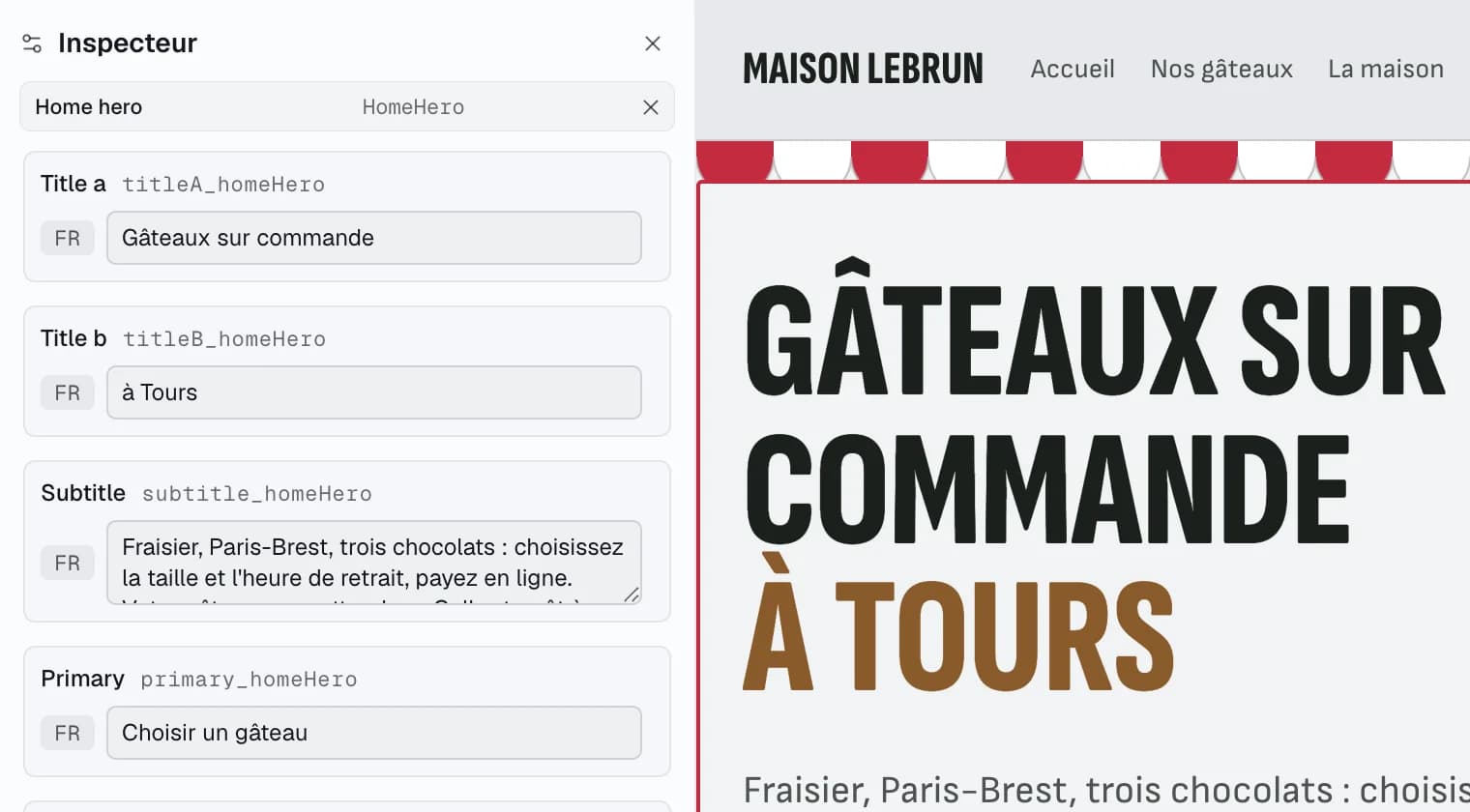
How a marker resolves
{x}, whenxis a slot of the block: the engine reads the keyx_<suffix>. If it is missing, an interactive block shows the slot'sdefaultValue, a static block showsneed_trads.{x}, whenxis not a slot: the engine reads the keyxas is in the page dictionary; if that is missing too, it showsx.{$path}: the key is the value read at$path, then the same resolution applies. This is how a block shows a label chosen by its configuration.
In the grocery demo, options.json lists the aisles; each aisle names its title by a slot id (aisleFl). The tree writes {$a.title} inside the loop: the value aisleFl is a slot, so the text shown is the one under the key aisleFl_productList.
{
  "__variantId": "productList",
  "config": {
    "aisles": [
      {
        "key": "fruits-legumes",
        "title": "aisleFl",
        "lead": "aisleFlLead",
        "photo": "rayon-legumes-bacs.jpg",
        "alt": "aisleFlAlt"
      },
      ...
    ]
  }
}{
"id": "aisle",
"primitive": "wrapper",
"repeat": { "over": "$aisles", "as": "a", "key": "a.key" },
"children": [
...
{
"id": "signTitle",
"primitive": "Heading",
"props": { "level": 2, "text": "{$a.title}" }
},
...
]
}Text goes in props.text, or as a string in children when it sits between nodes. A string can mix fixed text, values and keys: "x${it.quantity}", "${p.name}, ${v.label} : {addedToast}".
Validation messages do not go through a slot: a rule's error field is a key read as is in the dictionary, so it is written with its suffix (errName_orderFlow). A message set by an action ("to": "{errCart}"), on the other hand, goes through the errCart slot, which must exist in slots.json.
Values and operators
Every value in the tree (a prop, a condition, an action argument) is resolved at render time, or when the action runs, according to its form:
| Form | Example | Result |
|---|---|---|
"$path" | "$store.cartReducer.items" | The value read from the scope, of any type. The path uses dots; a list index is written .0. |
"!$path" / "!!$path" | "!!$emailError" | The value converted to a boolean, negated (!) or not (!!). |
"${path}" | "x${it.quantity}" | The value inserted into the text; empty when missing. |
"{key}" | "{cartTitle}" | The text of the slot or dictionary key. |
"{$path}" | "{$a.title}" | The text of the key that $path holds. |
| An object with one operator key | { "empty": "$store.cartReducer.items" } | The operator's result. |
| Any other object, a list | { "price": "$v.price" } | Resolved key by key, deeply. |
| Any other string, a number, a boolean | "button", 2, true | The value as is. |
$path is only read when it fills the whole string. "$it.price €" is literal text, shown as is: write "${it.price} €". A whole-value binding in a text position that resolves to an object renders nothing: bind a field ("$slot.text"), not the object.
The scope
The scope is the set of names a $path can read. From weakest to strongest (a stronger name hides the same weaker name):
store: the site memory, read as$store.<name>Reducer.<path>.locale: the page language, read as$locale.- The keys of
options.config, then ofoptions.fragments:config.aislesis read as$aisles. - The behavior hook's return value, if there is one.
- The
stateatoms. - The
derivevalues, computed in the order they are written.
Depending on context, the scope also holds: the variables of a repeat (the item, index, n, isFirst, isLast, count), $event inside an action, the result named by as, $prev and $next inside a watch, $arg inside an action passed through pass.
A derive or an atom named like an options.config key hides it, without a warning. Name an options key that holds a label xxxLabel (read as {$xxxLabel}), and keep the bare name for the computed value.
Operators
An operator is an object with exactly one key, and that key is an operator name. Its arguments are written as a list (a single argument may skip the list) and are resolved before the call, so an operator can contain another one. when, unless, where and an action's when treat an empty list as false; everywhere else, and so inside not, and, or and if, a value is true in the JavaScript sense, and an empty list is true there: test a list with empty. The operator list is closed:
| Operator | Form | Result |
|---|---|---|
eq | { "eq": [a, b] } | True when a and b are strictly equal, with no type conversion. |
ne | { "ne": [a, b] } | True when a and b differ. |
lt, lte, gt, gte | { "lt": [a, b] } | a < b, a <= b, a > b, a >= b. |
in | { "in": [x, list] } | True when the list contains x. |
empty | { "empty": a } | True for an empty list, null, a missing value or "". 0 and false are not empty. |
not | { "not": a } | The negation of a. |
and | { "and": [a, b, ...] } | The first false value, otherwise the last one. |
or | { "or": [a, b, ...] } | The first true value, otherwise the last one. Also used as a fallback value. |
if | { "if": [cond, then, else] } | then when cond is true, otherwise else (undefined when omitted). |
join | { "join": [sep, a, b, ...] } | The non-empty parts, joined by sep. Builds a class or a text. |
format | { "format": [v, "money", "eur"] } | An amount in units (not cents), formatted in the page language; the currency defaults to eur. Empty when v is empty. |
format | { "format": [v, "date"] } | A date in the page language's medium format, in UTC. |
number | { "number": v } | The number read from a text ("12,5" gives 12.5); undefined when the text is empty; the text unchanged when it is not a number. |
match | { "match": [list, "r", cond] } | The list items for which cond is true, the item being named r. |
{
  "id": "payText",
  "primitive": "Span",
  "props": {
    "text": {
      "join": [" ", "{payCta}", { "format": ["$store.cartReducer.total", "money", "eur"] }]
    }
  }
}{
"id": "slot",
"primitive": "Button",
"repeat": { "over": "$store.ordersReducer.slots", "as": "s", "key": "s.value" },
"props": {
"type": "button",
"text": "$s.label",
"aria-pressed": { "eq": ["$s.value", "$pickupAt"] },
"className": {
"join": [
" ",
"orderFlow-slot",
{ "if": [{ "eq": ["$s.value", "$pickupAt"] }, "is-picked", ""] }
]
}
},
"on": { "click": "pickSlot" }
}A value typed into a field ($event.value) is a string. { "eq": ["$visits", 4] } is only true when visits was set as a number ("to": 4); convert with number before comparing or sending input. An object that carries an operator key plus another key is not an operator: it is resolved as a plain object.
The block root: state, computed values, validation
Besides its node keys, the root of tree.json carries the block's behavior:
| Key | Form | Role |
|---|---|---|
state | { "<atom>": value } | The local state. An initial value may be a $ref to options.config or to the behavior, read once at mount. |
derive | { "<name>": { "fn": "...", "args": [...] } } | Values computed on every render. |
validate | { "<field>": [ { "rule": "...", "error": "..." } ] } | The rules of the form fields. |
actions | { "<name>": action } | Named actions, called by their name. |
onMount | action | An action run once, in the browser, after the first render. |
watch | { "<value>": action } | An action run when the value changes. |
logic | "<Name>" | The name of a behavior provided by Kubbler. |
refs / effects | ["<ref>"] / { "<name>": { "fn": "autofocus", "ref": "<ref>" } } | Element references and named effects. autofocus is the only available effect. |
{
  "state": {
    "date": "",
    "pickupAt": "",
    "pickupLabel": "",
    "customerName": "",
    "email": "",
    "phone": "",
    "note": "",
    "customerNameError": "",
    "emailError": "",
    "phoneError": "",
    "pickupError": "",
    "cartError": "",
    "submitError": "",
    "snapshot": [],
    "snapshotTotal": 0
  },
  "derive": { "minD": { "fn": "minDate", "args": [2] } }
}
state
Each atom is read as $atom and written by the set action. A dotted name writes into an object atom ("set": "form.email"). Validation writes a field's message into the <field>Error atom; the demos declare it as "".
derive
A derive calls a named function with arguments resolved in the scope (args may be a single value). The derive entries are computed in the order they are written, and each one reads those before it: a derive that reads one declared further down receives undefined, which numeric functions count as 0. An unknown function gives undefined. The function list is closed:
| Function | Arguments | Result |
|---|---|---|
add | a, b | a + b. A non-numeric argument counts as 0. |
mul | a, b | a * b, same rule. true counts as 1, false as 0. |
clamp | v, min, max | v brought within min and max. |
amountFromCents | cents | The amount in units, rounded to a whole number, as text (21800 gives "218"). "-" when the argument is not a number. |
range | n | The list [1, 2, ..., n], from 0 to 200 items. |
minDate | days | Today's date plus days days, formatted YYYY-MM-DD, in local time. |
findBy | list, key, value | The first item whose key field equals value, otherwise null. |
filterBy | list, key, query | The items whose key field contains query, ignoring case; the whole list when query is empty. |
trim | value | The text without leading and trailing spaces. |
mapWith | list, fn, key, as | Each item, plus an as field (value by default) computed by the fn function from its key field. |
passwordRules | password | The password criteria list, { key, met, label, iconName }, labels read from pwRuleLength, pwRuleCase, pwRuleDigit, pwRuleSpecial. |
A price simulator chains its computations from top to bottom; waste is a boolean, which mul counts as 1 or 0:
{
  "derive": {
    "lawnCost": { "fn": "mul", "args": ["$surface", 0.08] },
    "hedgeCost": { "fn": "mul", "args": ["$hedge", 1.2] },
    "perVisit": { "fn": "add", "args": ["$lawnCost", "$hedgeCost"] },
    "visitsCost": { "fn": "mul", "args": ["$perVisit", "$visits"] },
    "wasteCost": { "fn": "mul", "args": ["$waste", 15] },
    "monthly": { "fn": "add", "args": ["$visitsCost", "$wasteCost"] }
  }
}
validate
validate maps each field (a state atom) to a list of rules, tried in order: the first one that fails gives the field's message. A rule is written { "rule": "<name>", "args": [...], "error": "<key>" }; with "when": <condition>, it only applies when the condition is true. Validation only runs through an action (validate or validateAll): it clears <field>Error for every checked field, then writes the text of the error key there, or the key itself when the dictionary does not hold it.
| Rule | Arguments | Accepts |
|---|---|---|
required | - | A non-empty text, spaces removed. |
minLength | n | At least n characters. |
maxLength | n | At most n characters. |
email | - | An email address. |
alphaNum | min, max | Unaccented letters and digits; min and max bound the length. |
emailOrAlphaNum | min, max | An email address, or an identifier accepted by alphaNum. |
match | "$otherField" | The same value as the named atom (password confirmation). |
passwordPolicy | - | A password that meets the passwordRules criteria. |
number | - | A number (decimal comma accepted), or an empty field. |
date | - | A readable date, or an empty field. |
{
  "validate": {
    "customerName": [
      { "rule": "required", "error": "errName_orderFlow" },
      { "rule": "minLength", "args": [2], "error": "errName_orderFlow" }
    ],
    "email": [
      { "rule": "required", "error": "errEmail_orderFlow" },
      { "rule": "email", "error": "errEmail_orderFlow" }
    ]
  },
  ...
}
A validated field is a top-level state atom: validate reads neither a dotted path, nor a derive, nor $store. number and date accept an empty field: put required before them. A rule with an unknown name is skipped.
Behavior in JavaScript
When the DSL is not enough, a useLogic hook completes the block. The engine looks for web/configurations/logic/<id>/index.js (the block id), then for the Kubbler-provided behavior named by the logic key. The hook receives { name, id, options, dictionary, args }; what it returns joins the scope: a value is read as $name, a function is called through the call verb or by its name. A few-line hook is enough to expose a route parameter:
'use client';

export function useLogic({ args } = {}) {
  return { quoteId: (args && args.id) || '' };
}{
"onMount": {
"dispatch": {
"store": "quotesReducer",
"thunk": "fetchQuote",
"with": { "id": "$quoteId" }
}
}
}onMount and watch
onMount runs an action once, in the browser, after the first render, with that render's scope. watch maps a value to an action: the value is read again on every render, and the action runs when it has changed (never at mount), with $prev (the old value) and $next (the new one). This is how a block reacts to a change in the site memory.
{
  "onMount": [
    { "dispatch": { "store": "storesReducer", "thunk": "fetchStores" } },
    {
      "dispatch": {
        "store": "ordersReducer",
        "thunk": "fetchSlots",
        "skipEmpty": true,
        "with": { "storeId": "$store.storesReducer.currentId" }
      }
    }
  ],
  "watch": {
    "$store.storesReducer.currentId": {
      "when": "$next",
      "then": [
        { "set": "day", "to": "" },
        ...
        {
          "dispatch": {
            "store": "ordersReducer",
            "thunk": "fetchSlots",
            "with": { "storeId": "$next" }
          }
        }
      ]
    }
  }
}
At mount, the chosen store may not be known yet: skipEmpty does not send an empty storeId, and the watch fetches the slots again as soon as currentId changes.
refs declares element references ("refs": ["field"]), which a node receives through "ref": "$field". effects attaches a named effect to one ({ "fn": "autofocus", "ref": "field" }), run at mount and again when its when value changes.
Conditions, lists and events
when and unless
when renders the node when its value is true, unless when it is false. The value can be any DSL value: a $ref or an operator. A hidden node is not rendered at all, neither it nor its children.
{
  "id": "slotsEmpty",
  "primitive": "Span",
  "props": { "text": "{slotsEmpty}" },
  "when": {
    "and": [
      "$date",
      { "ne": ["$store.ordersReducer.status", "loading"] },
      { "empty": "$store.ordersReducer.slots" }
    ]
  }
}
repeat
repeat renders the node once per item of over. A value that is not a list renders nothing.
| Key | Role |
|---|---|
over | The list, as a $ref or an operator. |
as | The item name in the scope; item by default. |
key | The path of each item's key, without $ ("it.id"); the index by default. |
where | A condition evaluated for each item: only those that meet it are rendered. |
Each iteration exposes the item under its name, index (from 0), n (from 1), isFirst, isLast and count (the number of rendered items). "unless": "$isLast" on a node inside a repeated group places a separator between items.
{
  "id": "card",
  "primitive": "wrapper",
  "repeat": {
    "over": "$store.productsReducer.products",
    "as": "p",
    "key": "p._id",
    "where": { "eq": ["$p.category", "entremet"] }
  },
  "props": { "type": "article", "className": "d-flex flex-column" },
  ...
}
when and unless on the node that carries repeat are evaluated once, before the list, with the outer scope: they show or hide the whole list and do not see the item. To filter items, write the condition in repeat.where.
The iteration variables are written after the item: with "as": "n" (or index, isFirst, isLast, count), the item is overwritten by the ordinal. Inside where, these variables are not defined yet.
on
on maps an event to an action. The engine wires these events, and $event.value holds:
| Event | $event.value |
|---|---|
click | The value of the clicked element, often empty. |
input, change | The field's value, as text. For a checkbox (change), true or false. |
submit | No useful value. The native form submission is cancelled: the page does not reload. |
keydown | The key: "Enter", "Escape"... |
blur, focus, mouseenter, mouseleave, error | The element value, if it has one. |
input and change wire the same React handler (onChange): on a text field, both fire on every keystroke. A set without to writes $event.value: { "set": "email" } on input keeps the atom up to date, and the second step clears the error message.
{
  "id": "in-email",
  "primitive": "Input",
  "props": {
    "id": "orderFlow-email",
    "name": "email",
    "type": "email",
    "className": "orderFlow-input",
    "autoComplete": "email",
    "value": "$email",
    "variant": { "if": ["$emailError", "error", "default"] }
  },
  "on": { "input": [{ "set": "email" }, { "set": "emailError", "to": "" }] }
}
To react to a single key, guard the action with a condition: { "when": { "eq": ["$event.value", "Enter"] }, "then": "submit" } on keydown.
Actions
An action takes one of three forms:
- A string: the name of an action in
actions; failing that, a behavior function, called with no argument. - A list: actions run one after the other; each step waits for the previous one to finish, API calls included.
- An object: one or more verbs.
Inside an object, verbs always run in this order, whatever order they are written in: when, validate, validateAll, set, toggle, forEach, call, dispatch, fetch, reset, navigate, toast, then then.
| Verb | Form | Effect |
|---|---|---|
when / else | { "when": cond, ..., "else": action } | When cond is false, runs else (if present) and stops this object. |
validate | { "validate": ["email", "phone"] } | Validates these fields; on error, writes the messages and stops this object. A value that is not a list is ignored. |
validateAll | { "validateAll": true } | Validates the block's whole schema, and that of every interactive block rendered inside it; stops this object on error. |
set / to | { "set": "atom", "to": value } | Writes the atom. Without to, writes $event.value. A name starting with $ is first read from the scope. |
toggle | { "toggle": "atom", "value": v, "off": null } | Single selection: sets v, or off when the atom already holds v. With "mode": "multi", adds v to or removes it from a list. |
forEach | { "forEach": "$list", "as": "item", "do": action } | Runs do for each item, with the item and index in the scope. |
call | { "call": "function", "arg": v } | Calls a behavior function with a value (arg) or an object (with). |
dispatch | { "dispatch": { "store", "thunk", "with" } } | Runs a call or an action of the site memory (see the next section). |
fetch | { "fetch": { "path", "into" } } | Calls an API route without going through the memory. |
reset | { "reset": true } / { "reset": ["atom"] } | Puts atoms back to their initial value, with their <atom>Error messages. true targets every state atom and every validated field. |
navigate | { "navigate": "/${locale}/confirmation" } | Opens the page, at that exact path. |
toast | { "toast": "{saved}" } | Shows a short, information-level message. |
as | "as": "res" | Names the result of call, dispatch or fetch for the then of the same object. |
then | "then": action | The next action, run after every verb of the object. |
An object stopped by when, validate or validateAll goes no further, but the list that contains it carries on. A validation written alone in one step therefore does not prevent the next step: write the validation and the submission in the same object.
{ "on": { "click": { "toggle": "changing", "value": true, "off": false } } }What an action chain reads
An action reads the scope of the render the event came from. A set changes the state for the next render, not for the following steps of the same chain: $atom keeps its old value there, so does validate, and $store stays as it was before a dispatch. To chain on a result, name it with as; to react to a memory change, use watch.
A complete save: the empty with keys listed in skipEmpty are not sent, the result is named created, and the rest shows a message then opens the created record, or sets an error message.
{
  ...
  "dispatch": {
    "store": "quotesReducer",
    "thunk": "createQuote",
    "with": {
      "client": "$client",
      "city": "$city",
      "projectType": "$projectType",
      "amountHt": { "number": "$amountHt" },
      "sentAt": "$sentAt",
      "nextFollowUpAt": "$nextFollowUpAt",
      "assignedTo": "$assignedTo"
    },
    "skipEmpty": ["assignedTo"]
  },
  "as": "created",
  "then": {
    "when": { "or": ["$created.result.body.quoteId", "$created.result.body.data.quoteId"] },
    "then": [
      { "toast": "{saved}" },
      {
        "navigate": {
          "join": [
            "",
            "/devis/",
            {
              "or": ["$created.result.body.quoteId", "$created.result.body.data.quoteId"]
            }
          ]
        }
      }
    ],
    "else": { "set": "submitError", "to": "{errSubmit}" }
  }
}
navigate pushes the path as is. The Link primitive adds the language, navigate does not: on a multilingual site, write "/${locale}/...". A function called by call that throws stops the whole chain; a failing dispatch, on the other hand, gives an undefined result and the chain carries on.
The site memory and the project's API
The site memory (the Redux stores) is declared in web/configurations/stores/stores.json. Each entry creates a memory named <name>Reducer.
{
  "cart": {
    "persist": true,
    "initialState": { "items": [], "count": 0, "total": 0 },
    "statics": [
      "addItem",
      "updateQuantity",
      "removeItem",
      "clearCart",
      "incrementItem",
      "decrementItem"
    ],
    "cases": []
  },
  "orders": {
    "statics": [],
    "cases": [
      { "thunk": "fetchSlots", "actions": ["fulfilled", "pending", "rejected"] },
      { "thunk": "submitOrder", "actions": ["fulfilled", "pending", "rejected"] },
      ...
    ],
    "initialState": { "slots": [], "lastOrder": null, ... }
  },
  "payment": {
    "persist": false,
    "initialState": { "providerSecret": null, "phase": "form" },
    "statics": ["setProviderSecret", "setPaymentPhase"],
    "cases": [{ "thunk": "paymentUpdated", "actions": ["fulfilled", "pending", "rejected"] }]
  },
  ...
}| Key | Role |
|---|---|
initialState | The initial state. Kubbler adds status ("idle"), auth, error and monitoring: do not declare status yourself. |
persist | true: the memory is kept in the browser from one visit to the next. false by default. |
persistOmit | With persist, the fields never written to the browser. |
statics | Synchronous actions. Each one is a stores/<name>/statics/<action>/index.js file exporting staticContext(state, action). |
cases | Asynchronous calls: { "thunk", "actions": ["fulfilled", "pending", "rejected"], "cache" }, with stores/<name>/thunks/<thunk>/index.js (thunkContext) and stores/<name>/actions/<thunk>/index.js (actionContext). cache is a duration in seconds. |
A thunk calls a route of the project's API and returns its response as is, { status, body }: it does not throw on a 4xx or 5xx status. The actions/<thunk>/index.js file decides what the memory keeps.
import { _post } from '@asynccode/ac_tools';
import { getApiEndpoint } from '@utils';

export const thunkContext = async (args) => {
  const { recaptchaToken, ...rest } = args || {};
  return _post({
    endpoint: getApiEndpoint('endpoint1'),
    path: '/orders/submit',
    body: rest,
    headers: recaptchaToken ? { 'x-recaptcha-token': recaptchaToken } : {},
  });
};export const actionContext = {
pending: (state) => {
state.status = 'loading';
state.result = null;
},
fulfilled: (state, action) => {
const { status, body } = action.payload.result;
state.loading = false;
const data = body?.data || body || {};
state.slots = status === 200 && Array.isArray(data.slots) ? data.slots : [];
state.status = 'idle';
},
rejected: (state) => { ... },
};From the tree
A tree reads the memory through $store.<name>Reducer.<path> ($store.cartReducer.items) and renders again when it changes. It acts on it through the dispatch verb:
| Key | Role |
|---|---|
store | The memory name, with its suffix: ordersReducer. |
thunk | The name of the thunk or of the synchronous action. |
with | An object whose values are each resolved: the argument sent. |
arg | A single value, instead of with ("arg": "$it.id"). |
skipEmpty | true, or a list of keys: empty with keys (undefined, null, "") are not sent. 0 and false are. |
layer | "extras" (thunks) or "statics" (synchronous actions). Without layer, the engine looks for a thunk, then for a synchronous action of the same name. |
A thunk result, named by as, has the shape { result: { status, body }, thunkDuration }: read $res.result.status and $res.result.body. It is undefined when the call failed (network down) or was cancelled; the rest of the action still runs, with an else branch for that case.
Calling the project's API
- The route exists in the project's API: here
POST /orders/submit, in theordersgroup. stores.jsondeclares the thunk incases, with its two filesthunks/andactions/. The thunk targets theendpoint1entry ofapi.jsonand the route path.- The tree runs
{ "dispatch": { "store": "ordersReducer", "thunk": "submitOrder", "with": { ... } } }, then reads the response throughasor through$store.ordersReducer.
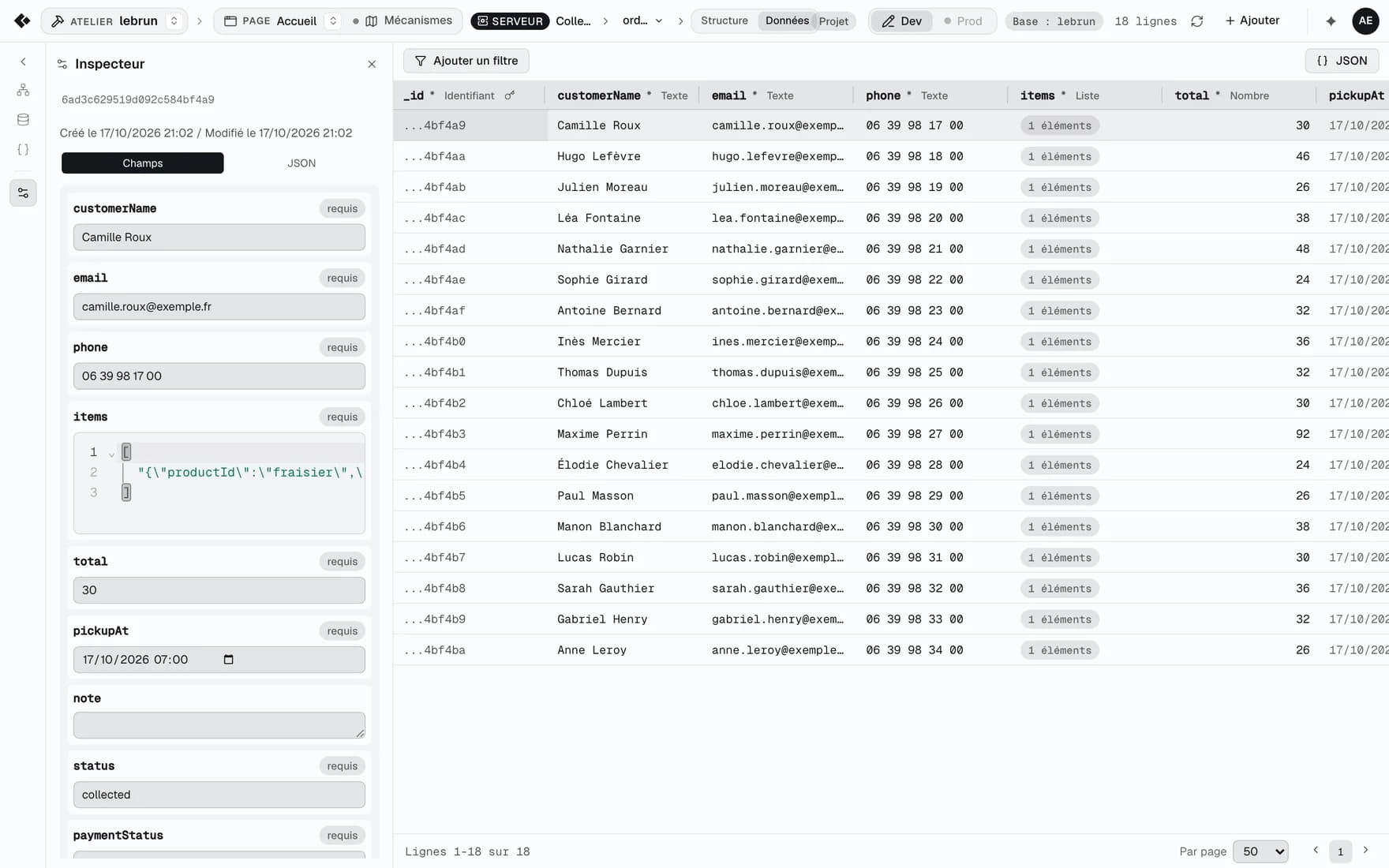
The fetch verb calls a route without a thunk: path (resolved), endpoint (an api.json entry, endpoint1 by default), method, params (the query string), body and into. The response is written into the atom named by into, with <into>.loading and <into>.error. GET reads; any other method is sent as POST, with body or, failing that, the whole local state of the block. A web/configurations/logic/<id>/bindings.json file can declare these calls outside the tree, { "calls": [{ "endpoint", "path", "method", "into", "trigger" }] }: without trigger (or with "mount"), at mount; otherwise after the action of the same name.
A thunk missing from cases does not exist, even when its files are in place: dispatch does nothing, with no error and no request.
Two Kubbler safeguards cancel a dispatch silently, and its result is then undefined: an identical call (same thunk, same arguments) still in progress, and, for 10 seconds, a call identical to one that received a status of 400 or more (401 excepted) or a network error.
Complete example: an order flow
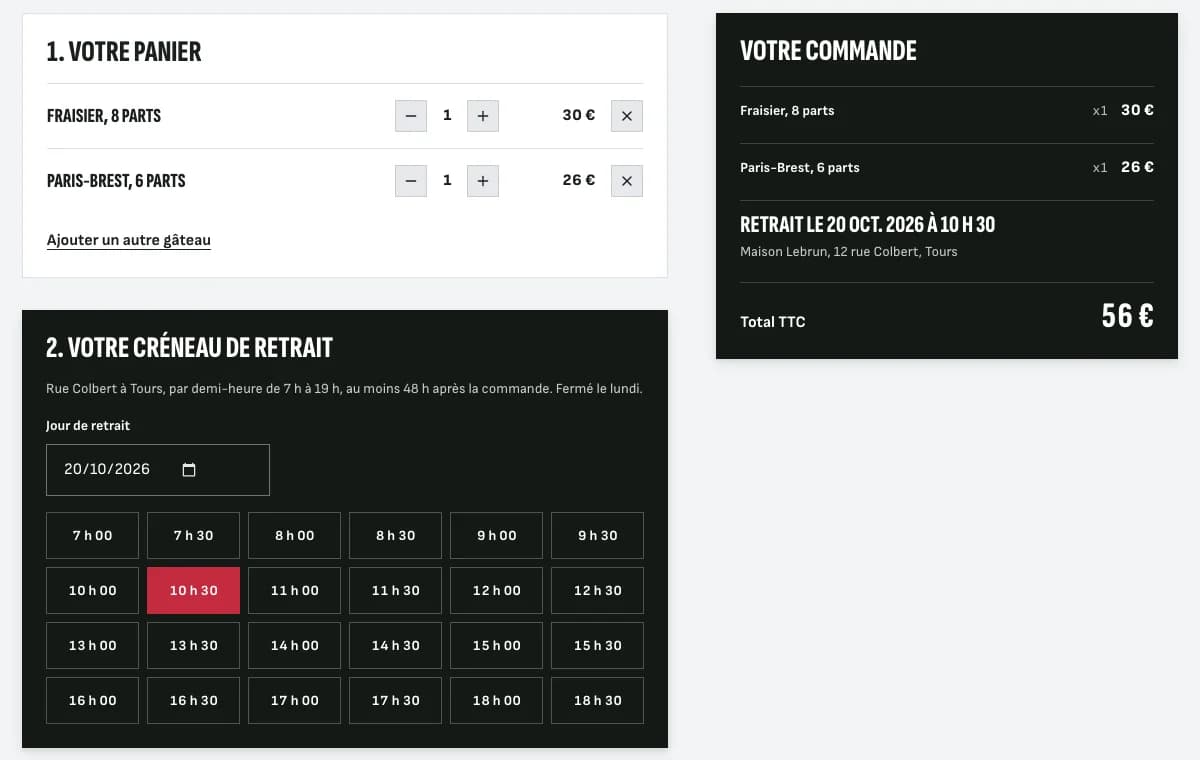
The bakery demo sells cakes for in-store pickup. Its orderFlow block (web/configurations/components/orderFlow/) chains the cart, the choice of a pickup slot, the contact details and payment, with no block-specific JavaScript. The commander page mounts it through a component node with id orderFlow.
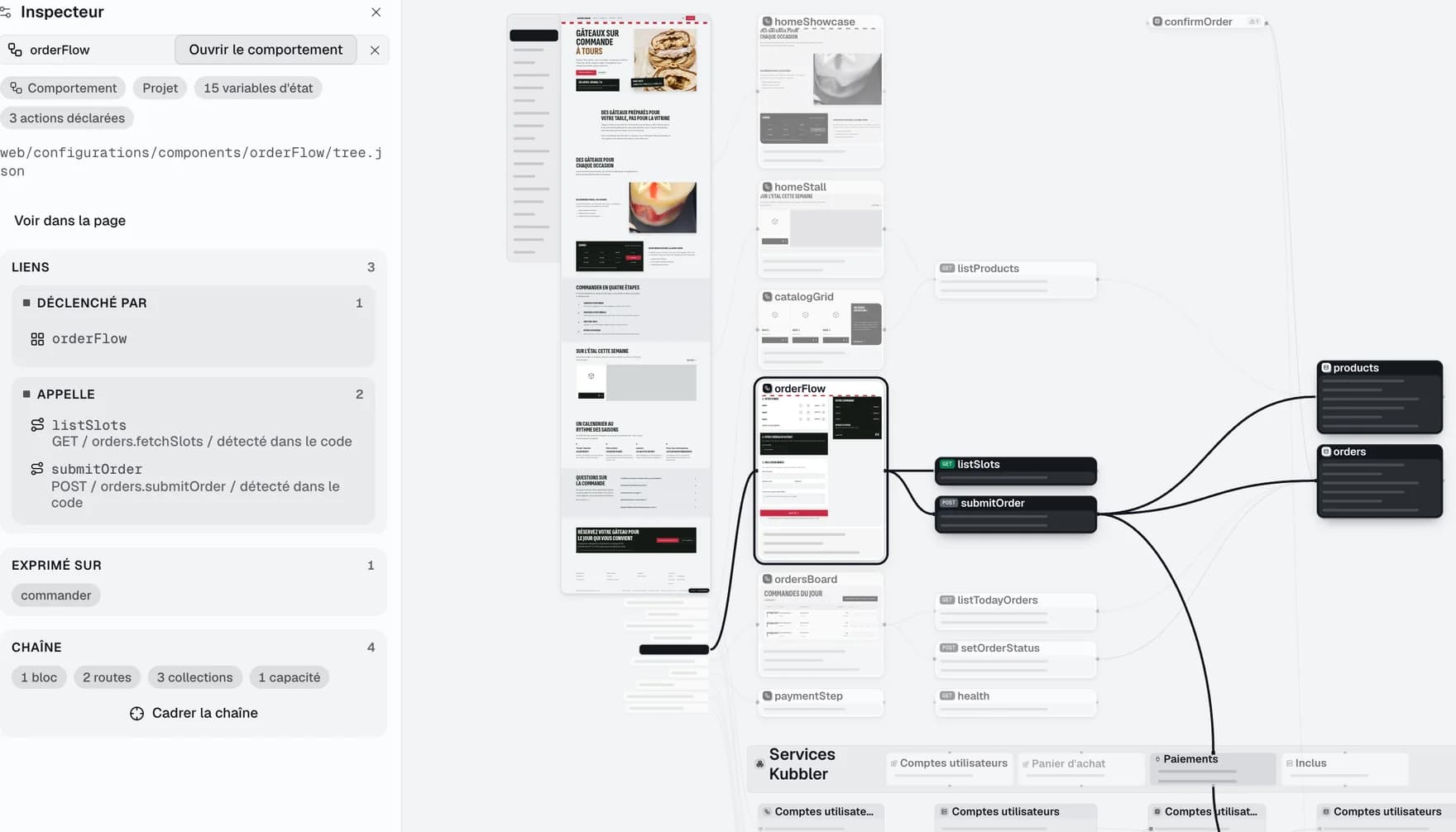
State and computed value
The root declares the form atoms (date, pickupAt, pickupLabel, customerName, email, phone, note), one message atom per validated field, three step messages (cartError, pickupError, submitError) and two copy atoms (snapshot, snapshotTotal). A single computed value: minD, today plus two days, set as the min of the date field to enforce 48 hours of notice. The block root section shows the full state and the validation of customerName and email.
The cart comes from the memory
The cart is not in the block state. It lives in the cart memory, kept in the browser (persist: true) and filled through the synchronous addItem action from the home page and the cakes page. The block reads it (repeat over $store.cartReducer.items, total $store.cartReducer.total formatted in euros) and changes it through its synchronous actions incrementItem, decrementItem and removeItem, with "layer": "statics" and the line id as arg.
{
  "id": "less",
  "primitive": "Button",
  "props": {
    "type": "button",
    "aria-label": "{qtyLess}",
    "className": "orderFlow-icon d-inline-flex align-items-center justify-content-center"
  },
  "on": {
    "click": {
      "dispatch": {
        "store": "cartReducer",
        "thunk": "decrementItem",
        "layer": "statics",
        "arg": "$it.id"
      }
    }
  },
  "children": [
    {
      "id": "lessIcon",
      "primitive": "Icon",
      "props": { "name": "Minus", "size": 16 }
    }
  ]
}
The pickup slot
The date field writes date, then calls the pickDate action with the same event. pickDate clears the chosen slot and, when a date is set, runs the fetchSlots thunk with { "date": "$event.value" }. Depending on the orders memory, the block then shows a loading message (status is "loading"), a message when the list is empty, or one button per slot. A click calls pickSlot, which copies $s.value and $s.label; the chosen button gets aria-pressed and the is-picked class (see the join example in Values).
{
  "id": "in-date",
  "primitive": "Input",
  "props": {
    "id": "orderFlow-date",
    "name": "date",
    "type": "date",
    "min": "$minD",
    "value": "$date",
    "className": "orderFlow-input orderFlow-input--chalk"
  },
  "on": { "change": [{ "set": "date" }, "pickDate"] }
}{
"pickDate": [
{ "set": "pickupAt", "to": "" },
{ "set": "pickupLabel", "to": "" },
{ "set": "pickupError", "to": "" },
{
"when": "$event.value",
"then": {
"dispatch": {
"store": "ordersReducer",
"thunk": "fetchSlots",
"with": { "date": "$event.value" }
}
}
}
],
"pickSlot": [
{ "set": "pickupAt", "to": "$s.value" },
{ "set": "pickupLabel", "to": "$s.label" },
{ "set": "pickupError", "to": "" }
]
}Paying
The pay action is a list of four steps. The first three set the messages: submitError cleared, cartError depending on whether the cart is empty (when, then, else), pickupError when no slot is chosen. None of these steps stops the others: all messages show at once.
{
  "pay": [
    { "set": "submitError", "to": "" },
    {
      "when": { "empty": "$store.cartReducer.items" },
      "then": { "set": "cartError", "to": "{errCart}" },
      "else": { "set": "cartError", "to": "" }
    },
    {
      "when": { "not": "$pickupAt" },
      "then": { "set": "pickupError", "to": "{errPickup}" }
    },
    ...
  ]
}
The fourth step carries the whole submission in a single object. Its when requires a non-empty cart and a slot; validate checks the name, email and phone and stops the object if one fails; dispatch sends the order to the submitOrder thunk. note goes through { "if": ["$note", "$note"] }: when empty, it is undefined and the key is not sent, since JSON does not write an undefined value.
{
  "when": { "and": [{ "not": { "empty": "$store.cartReducer.items" } }, "$pickupAt"] },
  "validate": ["customerName", "email", "phone"],
  "dispatch": {
    "store": "ordersReducer",
    "thunk": "submitOrder",
    "with": {
      "customerName": "$customerName",
      "email": "$email",
      "phone": "$phone",
      "note": { "if": ["$note", "$note"] },
      "pickupAt": "$pickupAt",
      "items": "$store.cartReducer.items"
    }
  },
  "as": "order",
  "then": [
    {
      "when": {
        "or": [
          "$order.result.body.providerSecret",
          "$order.result.body.data.providerSecret"
        ]
      },
      "then": [
        { "set": "snapshot", "to": "$store.cartReducer.items" },
        { "set": "snapshotTotal", "to": "$store.cartReducer.total" },
        {
          "dispatch": {
            "store": "paymentReducer",
            "thunk": "setProviderSecret",
            "layer": "statics",
            "arg": {
              "or": [
                "$order.result.body.providerSecret",
                "$order.result.body.data.providerSecret"
              ]
            }
          }
        },
        {
          "dispatch": { "store": "cartReducer", "thunk": "clearCart", "layer": "statics" }
        }
      ],
      "else": { "set": "submitError", "to": "{errSubmit}" }
    }
  ]
}
The result is named order. When the response carries a providerSecret (looked up in two places with or, since the response may wrap it in data), the block copies the cart and its total into snapshot and snapshotTotal, hands the secret to the payment memory (setProviderSecret), then empties the cart (clearCart). The copy reads the cart from the render the click came from, so before it is emptied. Otherwise submitError receives {errSubmit}; a network error gives an undefined result and takes the same branch.
The payment screen
Moving on to payment is not a block atom: it is $store.paymentReducer.providerSecret. The form steps carry "unless": "$store.paymentReducer.providerSecret", the paying node carries the opposite when and embeds the paymentStep block through a fragment node. The summary reads the cart until payment has started, then snapshot, and the total follows the same rule with an if:
{
  "id": "recapTotalValue",
  "primitive": "Span",
  "props": {
    "text": {
      "format": [
        {
          "if": [
            "$store.paymentReducer.providerSecret",
            "$snapshotTotal",
            "$store.cartReducer.total"
          ]
        },
        "money",
        "eur"
      ]
    }
  }
}
Limits and pitfalls
What the DSL does not do, and the mistakes that produce no message.
No route parameter in the scope
The scope contains neither the dynamic route segments (devis/[id]) nor the query string. A few-line hook, web/configurations/logic/<id>/index.js, exposes them: the page passes it args, which carries locale, pathname and one field per dynamic segment (see Behavior in JavaScript). For the query string, the hook reads it with Next's useSearchParams.
No division, no rounding
For arithmetic, derive offers add, mul and clamp: no subtraction, no division, no rounding. A subtraction is written add(a, mul(b, -1)), a division mul(a, 0.01) (the inverse of the divisor). The only rounding is amountFromCents, which rounds to the unit and returns a text: multiply by 100 first to round an amount to the euro. A configurator computes a price, a deposit and a balance this way:
{
  "derive": {
    ...
    "unitRaw": { "fn": "add", "args": ["$sub1", "$motorCost"] },
    "unitCents": { "fn": "mul", "args": ["$unitRaw", 100] },
    "unitPrice": { "fn": "amountFromCents", "args": ["$unitCents"] },
    "total": { "fn": "mul", "args": ["$unitPrice", "$quantity"] },
    "dRate": {
      "fn": "mul",
      "args": ["$store.configuratorReducer.rule.depositPercent", 0.01]
    },
    "depRaw": { "fn": "mul", "args": ["$total", "$dRate"] },
    "depCents": { "fn": "mul", "args": ["$depRaw", 100] },
    "deposit": { "fn": "amountFromCents", "args": ["$depCents"] },
    "depNeg": { "fn": "mul", "args": ["$deposit", -1] },
    "balance": { "fn": "add", "args": ["$total", "$depNeg"] }
  }
}
format with money expects units: a price in cents shows a hundred times too large, convert it with mul(price, 0.01). amountFromCents returns "-" when its argument is not a JavaScript number, a "21800" text included: give it the result of a mul.
The CSS specificity of styleJson
styleJson styles are compiled into the /* forge:nodes:start */ ... /* forge:nodes:end */ region of the block's style.css, under a doubled selector carrying the block id and the node id: [data-forge-id="orderFlow--root"][data-forge-id="orderFlow--root"], with a specificity of (0,2,0). The region is appended at the end of the file, after the hand-written CSS. A one-class rule (.orderFlow-pay) loses against it; a two-part rule (.orderFlow-slot.is-picked, .orderFlow-pay:hover) loses too, at equal specificity, because it comes first.
.orderFlow-pay {
  gap: var(--space-2);
  padding: var(--space-4) var(--space-6);
  font: inherit;
  font-size: var(--text-lg);
  font-weight: var(--weight-bold);
  color: var(--ink-text-on-brand);
  background: var(--brand);
  border: none;
  border-radius: var(--radius-sm);
  box-shadow: var(--shadow-brand);
  cursor: pointer;
  transition: background-color var(--duration-base) var(--ease-out), transform var(--duration-base) var(--ease-out);
}
.orderFlow-pay:hover {
  background: var(--brand-secondary);
  transform: translateY(-2px);
}
.orderFlow-pay:disabled {
  opacity: 0.6;
  cursor: progress;
  transform: none;
}
/* forge:nodes:start */
[data-forge-id="orderFlow--root"][data-forge-id="orderFlow--root"] { display: grid; grid-template-columns: minmax(0, 1fr); gap: var(--space-10); padding-bottom: var(--space-16); }
...
/* forge:nodes:end */- A property that changes with a state (hover, an
is-onclass,:disabled) must not also be set in the node'sstyleJson: keep it in the class, or write the state in thehover,focus-visibleoractiveblocks of thestyleJson. In the demo, the payment button has nostyleJson: its background, hover and disabled state live together in.orderFlow-pay. - The blocks of a
styleJson:base,hover,focus-visible,active,before,after,hover-before,hover-after, and the minimum-width thresholdssm(576 px),md(768 px),lg(992 px),xl(1200 px),xxl(1400 px). - The region is rewritten by the tools that save the block (Workshop, API); the CSS outside the region is never touched. A
styleJsonedited by hand only shows once the region is recompiled. - Every item of a
repeatshares the node'sdata-forge-id: one rule reaches them all.
Other pitfalls
whenon arepeatnode is evaluated before the list: filter withrepeat.where."as": "n","index","count","isFirst"or"isLast": the item is overwritten by the iteration variable.- A
derivethat reads one declared further down receivesundefined, counted as0. - Input is text:
eqcompares without conversion, go throughnumber. - An empty list is false for
when, but true insidenot,and,orandif: test it withempty. - A
setis not visible to the following steps of the same chain. - A
validatealone in a step does not stop the next step. navigatedoes not prefix the language;Linkdoes.fetchsends any method other thanGETasPOST.toastalways shows an information-level message.- A thunk missing from
casesdoes nothing; an identical call repeated within 10 seconds of a failure is cancelled. - An embedded block only gets its own dictionaries if it is also listed in the page's
structure.json.